
Team
Inspect Zero Trust users, identity profiles, sign-ins, and application activity.
Zero Trust > Team lists people with a recorded successful sign-in to your account's applications. These are application visitors, separate from the users who administer your Loclix dashboard. Profiles identify a person by their identity provider and immutable provider account ID. Accounts from different providers remain separate even when their email addresses match.
Team directory
- Open Zero Trust > Team.
- Review the user, identity provider, last sign-in, last activity, and sign-in count.
- Select a user's name to open their profile.
Select Refresh Team to fetch current activity. Use Load more members when more directory entries are available. Failed or unverified attempts alone do not create a profile.
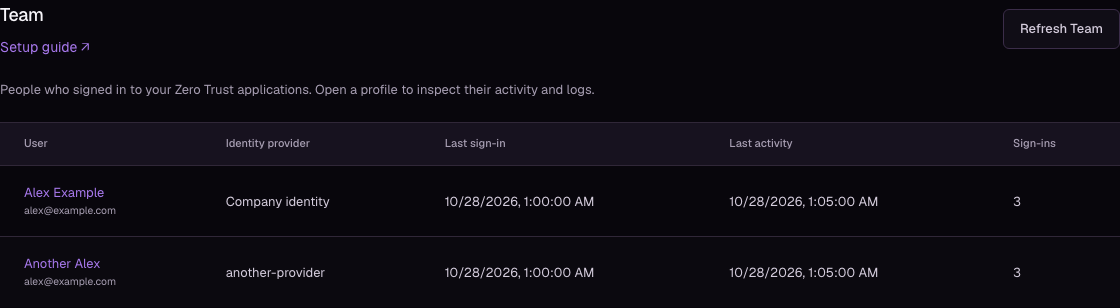
User profiles
The profile shows the provider, immutable account ID, verified email when available, first and last sign-in, and recorded event count. Display names come from the provider; an email address or account ID appears when no name is available.
Activity and logs shows that identity's recorded sign-in decisions, authenticated requests, request outcomes, and attributable logout events across the account's current websites. Each row shows the application, website, event reason, request path, status, and available client IP or request ID.
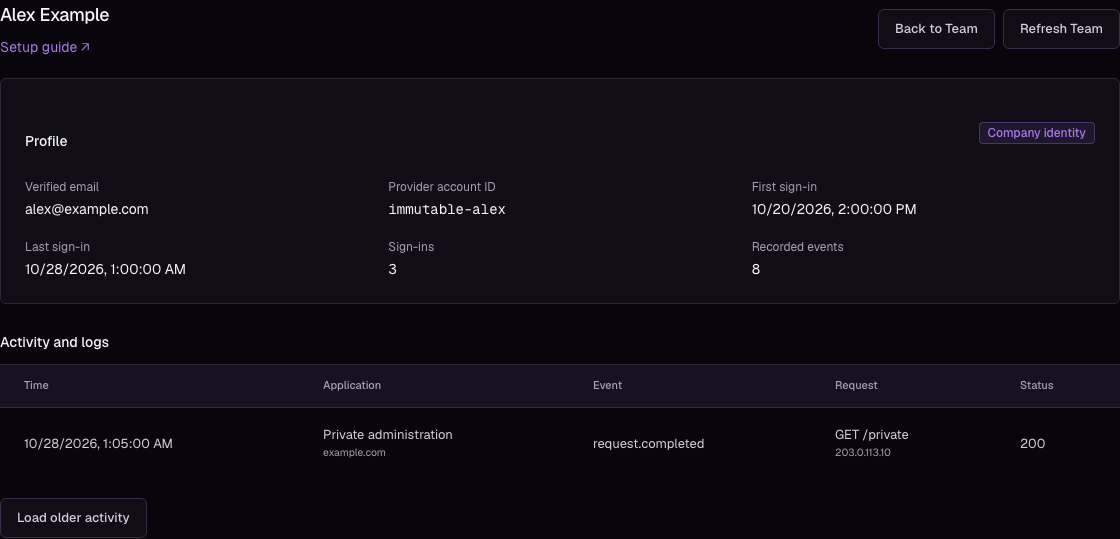
Select Load older activity to keep the current rows and append earlier records. Select Back to Team to return to the directory. Profile URLs can be reopened by dashboard users authorized for that account.
Recorded activity
Retained sign-in history is indexed when you first open Team. Indexing retained sign-in activity appears while earlier records are processed; profiles update automatically. If loading fails, select Retry Team.
Sign-in counts include recorded allowed sign-ins through an identity provider and reuse of an account session. They are not counts of distinct people or page views. Activity counts include verified identity events; they are independent of sampled request analytics.
Only events attributed to the verified provider account appear in its profile. Unverified email attempts and events without an identity remain in Access activity. Historical events remain available only while retained. Profiles do not grant access: use policies and email lists to control permissions.